Top AI Appointment Scheduling Agents For CX: Pricing, Integrations, And Enterprise Fit
How AI Scheduling Solutions Differ
AI Receptionist Services, Voice Agents, And Scheduling Software
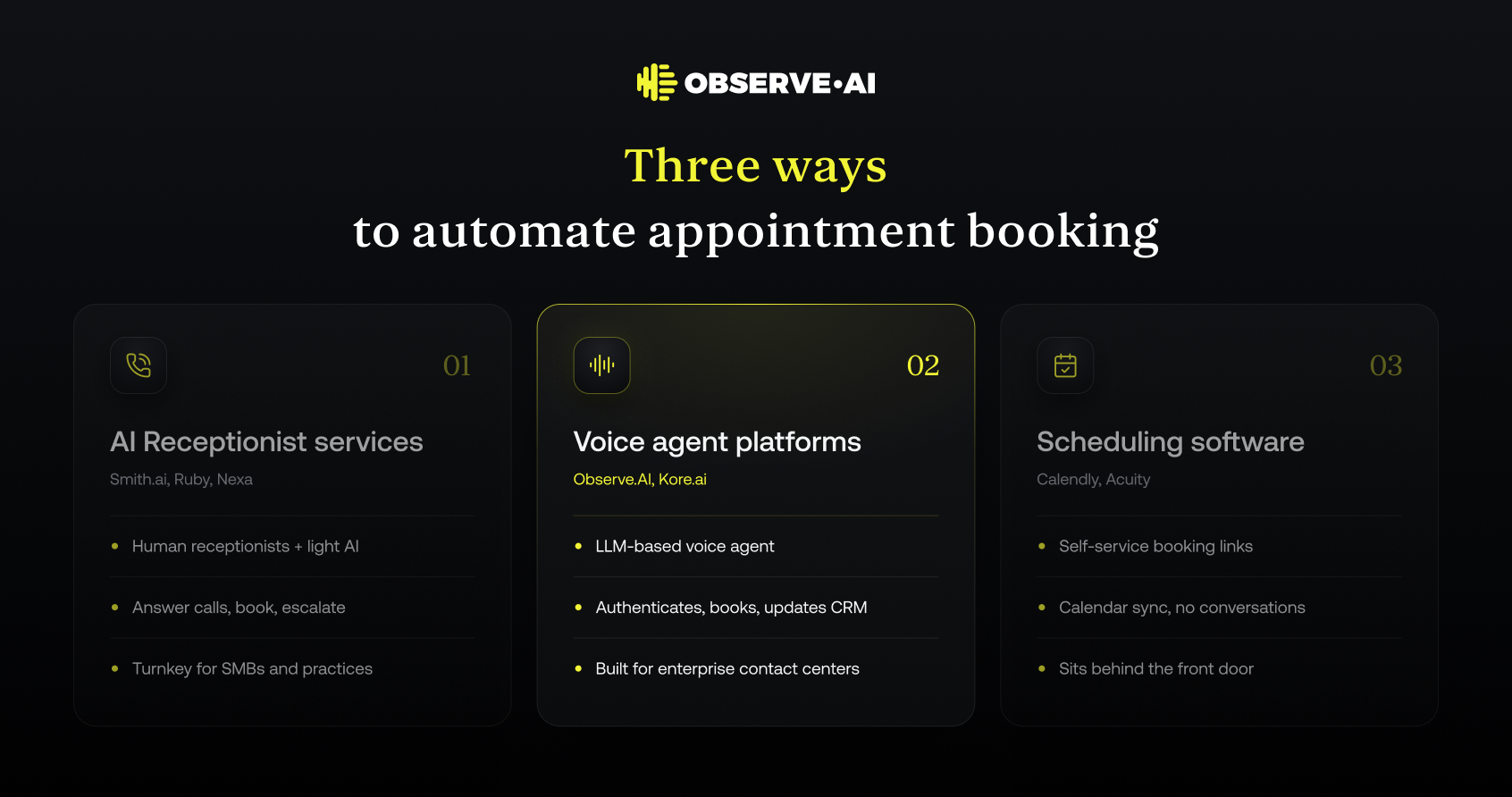
Appointment scheduling in customer experience now spans three overlapping categories:
- Virtual Receptionist and AI Receptionist services: These providers combine human receptionists with light automation. They answer inbound calls, capture client details, perform appointment booking in a connected calendar or practice-management system, and escalate to the business when needed. Examples: Smith.ai, Ruby, Nexa.
- Voice AI agent platforms: Voice AI platforms let teams build a voice agent that can answer calls, understand natural language, authenticate the customer, access a CRM or scheduling tool, and complete actions such as booking or rescheduling an appointment. Examples: enterprise-grade platforms like Observe.AI and Kore.ai.
- Standalone scheduling software: Tools like Calendly and Acuity are built for self-service online scheduling. They expose an availability link or widget, handle basic booking, rescheduling, and cancellation, and sync with a calendar (Google Calendar, Microsoft Outlook, and others).
For many small and mid-sized businesses, receptionist services act as an AI Receptionist in practice, even when much of the work is still human-led. Increasingly, they are adding voice AI to automate predictable appointment workflows while humans handle edge cases.
Voice agent platforms use LLM-based conversation understanding and broader workflow orchestration to handle more complex CX than simple IVRs or menu trees. They tend to fit enterprise contact centers that need governance, evaluation, and lifecycle management.
Scheduling software, on its own, does not answer calls or manage conversations. For CX leaders, it usually sits behind a receptionist service or voice AI agent that acts as the conversational front door.
Most contact centers evaluating AI appointment agents are looking for voice-first automation that sits between customers and existing scheduling systems, not just another calendar app. The main trade-off is between a managed Virtual Receptionist service and a configurable voice AI agent built on an agentic CX platform. For a real-world example, see how AI voice agents handle after-hours patient scheduling.
The Enterprise Contact-Center Use Case
Enterprise contact centers have very different requirements than a single practice or small business:
- High volume and concurrency: Thousands or millions of calls per month, with peaks driven by campaigns, seasonal demand, or disruptions.
- Multiple queues and skills: Different appointment types, lines of business, or geographies, all with distinct rules and calendars.
- Tight systems integrations: Scheduling is usually part of a larger workflow that touches CRM, billing, EMR and practice-management, ticketing, and even outbound reminders.
- Compliance and governance: Regulated industries (healthcare, financial services, insurance, legal) must control how AI agents authenticate, capture consent, handle PHI and PII, and log interactions.
- Human escalation: Many appointment calls surface eligibility issues, complaints, or urgent needs that a Virtual Receptionist or voice agent must route to live agents with context.
Because of this, large organizations tend to favor agentic CX platforms such as Observe.AI or Kore.ai, which allow them to build, test, evaluate, govern, and continuously improve AI agents across multiple appointment workflows, rather than locking into a single pre-packaged scheduling product. Healthcare is a good example: AI agents for healthcare organizations handle scheduling alongside prescription requests, billing, and insurance verification on one platform.
Virtual Receptionist services like Smith.ai, Ruby, and Nexa tend to be a better fit for distributed small offices, franchises, or professional services firms with moderate call volumes and simpler routing logic.
Quick Comparison Of The Shortlisted Platforms
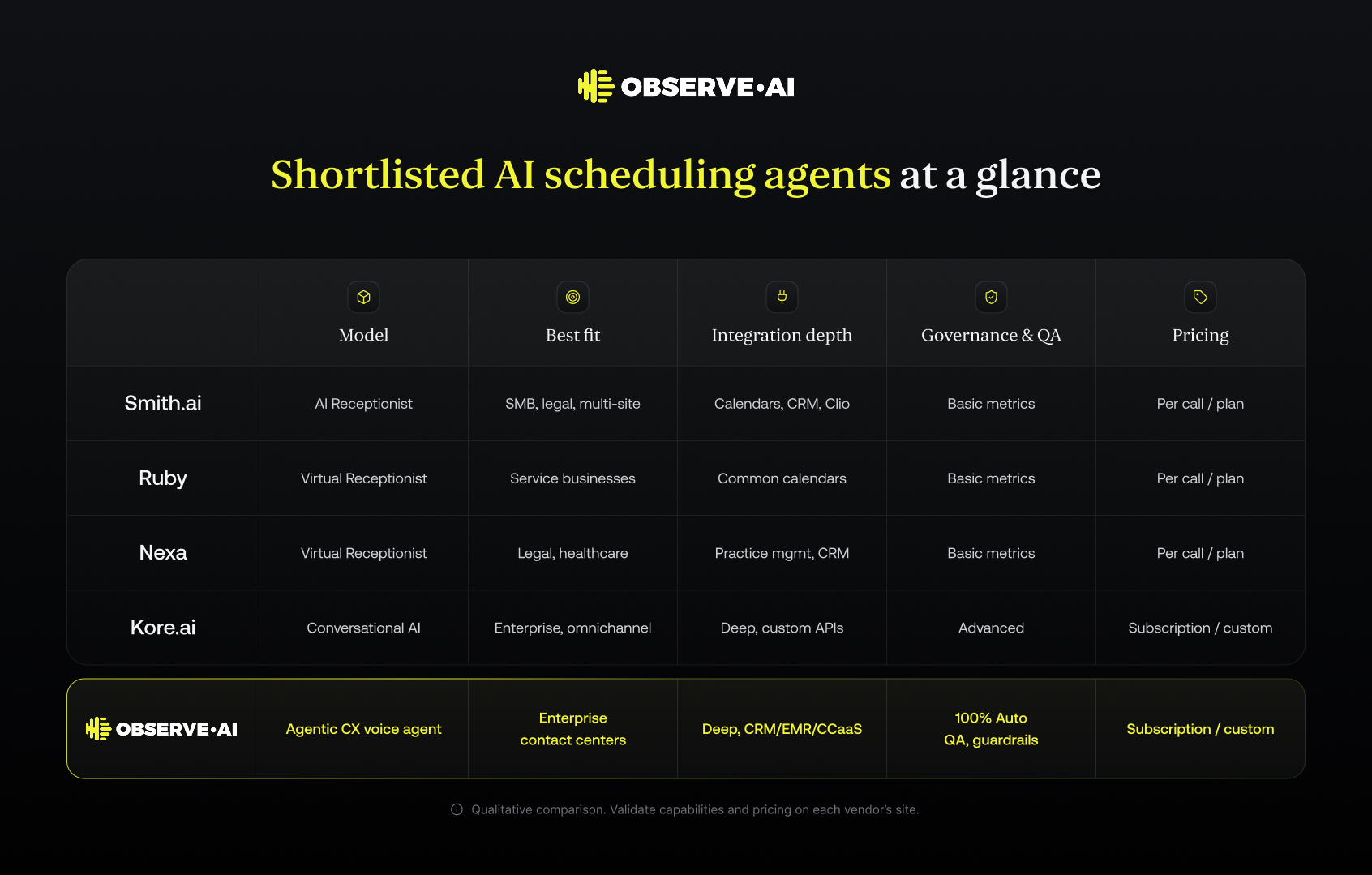
Below is a qualitative comparison of commonly shortlisted options for appointment booking and scheduling in CX. Exact capabilities and pricing models vary by plan and change over time, so teams should validate on each vendor's site.
- Smith.ai: A well-known Virtual Receptionist and AI Receptionist provider that supports inbound and outbound calls, intake, and appointment booking for businesses. It connects to calendars, CRM tools, and legal and medical practice-management systems. Smith.ai is oriented toward small and mid-sized businesses but can be used by multi-location organizations.
- Ruby: A Virtual Receptionist and chat provider focused on service-oriented businesses. Ruby operators handle appointment scheduling, message taking, and basic client intake. The service connects to common calendars and some CRM platforms, but it is less focused on deep, customizable enterprise integrations.
- Nexa: A Virtual Receptionist service with strong positioning in legal, healthcare, and home services. Nexa focuses heavily on appointment booking into practice-management or CRM tools, often for multi-location practices. It blends human receptionists with scripted workflows.
- Kore.ai: An enterprise conversational AI platform that supports voice AI, chatbots, and digital agents across channels. Enterprises can build custom appointment workflows, connect to internal systems (scheduling, CRM, EMR), and orchestrate complex journeys. It requires more implementation effort but gives deep control.
- Observe.AI: An agentic CX platform built for contact centers that want AI agents to complete meaningful work, including scheduling, rescheduling, and follow-up tasks. Observe.AI focuses on voice-first AI agents, real-time assistance, QA, and operational intelligence in one contact-center-native platform. Appointment workflows are configured against existing calendar, CRM, and practice-management systems with strong governance and evaluation.
In broad terms:
- Virtual Receptionist services (Smith.ai, Ruby, Nexa) win on turnkey deployment for call answering and basic appointment booking.
- Voice AI platforms (Kore.ai, Observe.AI) win on scalability, integration depth, and enterprise control for high-volume scheduling and more complex CX scenarios.
How Well Each Platform Handles Appointment Workflows
Booking, Rescheduling, Cancellation, And Confirmation
Most solutions claim to support the full appointment lifecycle, but they differ in how deeply they integrate and how much configuration is required.
Virtual Receptionist services (Smith.ai, Ruby, Nexa). Human receptionists, increasingly assisted by AI tools, typically:
- Look up real-time availability in a connected calendar or practice-management system.
- Offer appointment slots, capture client information, and complete the booking.
- Handle rescheduling and cancellations by following predefined rules.
- Trigger confirmations and reminders via the underlying calendar or practice-management platform.
The quality of the workflow depends on how clearly businesses define scheduling rules (buffer times, overbooking, no-show policies) and on the strength of each vendor's integrations.
Voice AI agent platforms (Kore.ai, Observe.AI). AI agents can:
- Identify intent ("I need to book an appointment," "Can I move my appointment to next week?").
- Authenticate the client using account numbers, phone numbers, or CRM lookups.
- Check multiple calendars or scheduling systems based on the call's routing or line of business.
- Enforce complex rules, such as provider specialties, eligibility, or pre-visit requirements.
- Confirm or change appointments in real time and send follow-ups over SMS or email.
Because these agents are built on an agentic architecture, they can also chain tasks: updating CRM fields, opening a ticket, sending a confirmation, and summarizing the call for downstream teams. Rescheduling and cancellation workflows matter as much as new bookings, because they return open slots to the schedule sooner. Observe.AI explains why empty appointment slots are a workflow problem, not just a reminder problem.
For enterprise contact centers, the key question is not whether a vendor can book appointments at a basic level, but whether it can reliably execute your specific scheduling rules across systems and lines of business.
Conversation Handling, Escalation, And Human Handoff
Appointment calls often surface issues that go beyond simple booking:
- Insurance or eligibility questions.
- Urgent clinical symptoms or service outages.
- Billing disputes.
- Complaints or high-value sales opportunities.
Different solution types manage this risk differently.
Virtual Receptionist services. Receptionists can follow playbooks, identify risk, and escalate in real time:
- Warm-transfer calls into internal queues or on-call staff.
- Take detailed messages for complex issues.
- Use basic disposition codes for reporting.
The trade-off is consistency. Human receptionists vary in skill and adherence to procedure, so enterprises often see them as an extension of the front desk rather than a core contact-center channel.
Voice AI agents. AI agents on platforms like Observe.AI and Kore.ai can:
- Detect frustration or risk signals in the conversation.
- Stay within strict guardrails on what they may and may not say.
- Escalate to a human when rules or confidence thresholds are breached.
- Hand the call to a live agent queue (voice or digital) with the full interaction summary and context, reducing handle time.
Agent Risk And Escalation: How To Design Safe Handoffs
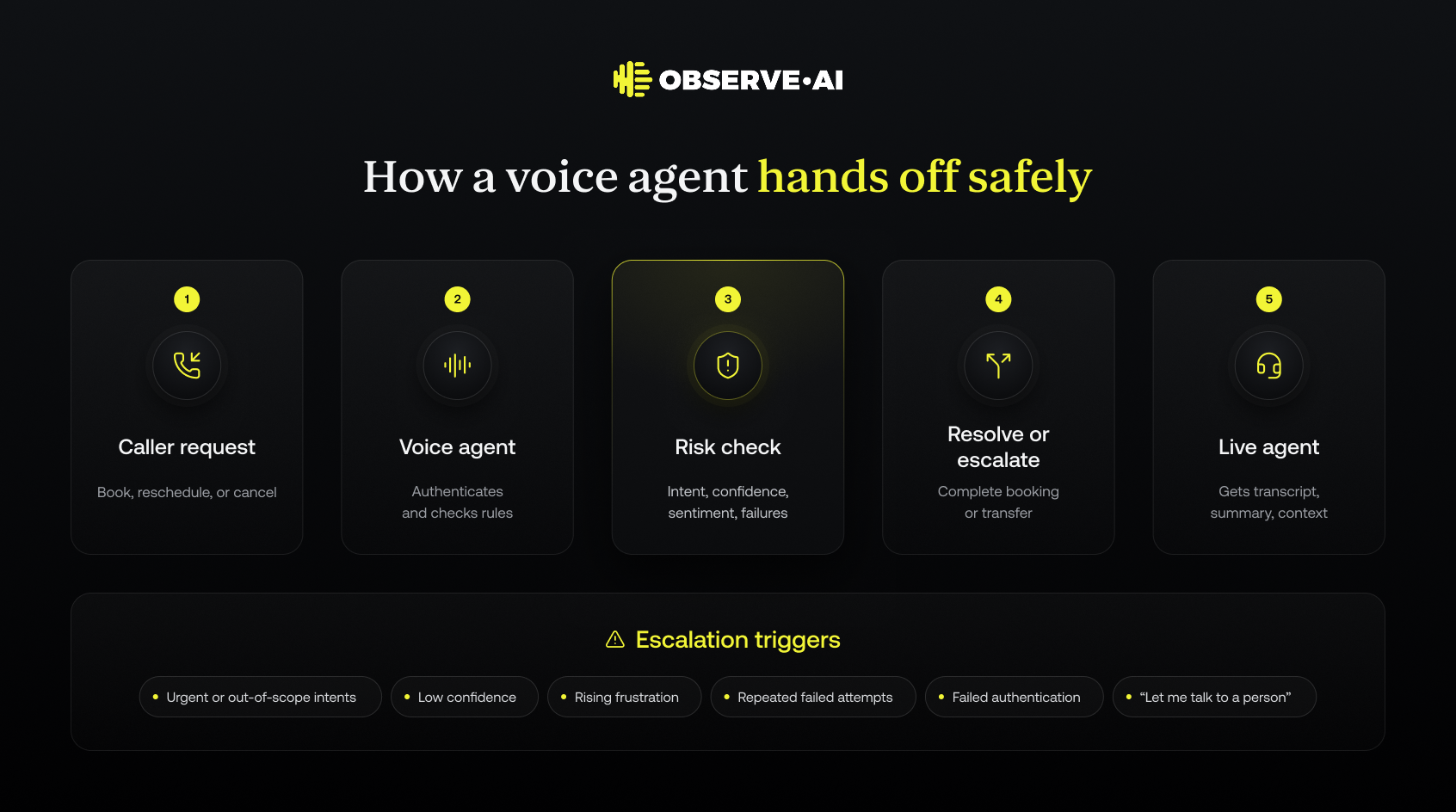
Agent risk is the chance that an AI agent books the wrong appointment, mishandles sensitive data, answers a question it should not, or keeps a caller stuck in a loop when a human is needed. Escalation design is how contact centers contain that risk. For appointment scheduling, the goal is simple: the voice agent should complete routine bookings on its own and hand off everything else quickly, with full context.
Common agent risks in appointment workflows:
- Booking errors: Double-bookings, the wrong provider or location, or ignored eligibility and pre-visit rules.
- Compliance exposure: PHI or PII captured or disclosed before the caller is authenticated or has given consent. See this guide to HIPAA-compliant AI voice agents for healthcare for the controls regulated teams should require.
- Out-of-scope answers: A voice agent responding to clinical, legal, or financial questions it is not approved to handle.
- Missed urgency: Failing to recognize emergencies, complaints, or churn signals hidden in a routine scheduling call.
- Loop failures: Repeated failed attempts that frustrate the caller and damage CSAT.
Escalation triggers to define before launch:
- Intent and keyword triggers: Phrases like "chest pain," "speak to a lawyer," or "cancel my account."
- Confidence thresholds: Hand off when the agent's understanding of the request falls below a set level.
- Sentiment signals: Rising frustration, anger, or distress.
- Failure counts: For example, two failed attempts to find an available slot.
- Authentication failures: The caller cannot be verified against the CRM or practice-management record.
- Explicit requests: Always honor "I want to talk to a person."
Questions to ask every vendor:
- How does the agent decide to escalate, and who owns and updates those rules?
- Where are transfers routed: a skill-based queue, a specific location, or on-call staff?
- What context reaches the live agent: transcript, summary, intent, and authentication status?
- How are escalations measured, including escalation rate, containment rate, and resolution after transfer?
- How are risky interactions reviewed in QA and used to improve the agent?
AI Receptionist services like Smith.ai, Ruby, and Nexa manage risk through human receptionists following playbooks, which works well at moderate volumes but varies by individual. Voice agent platforms like Observe.AI and Kore.ai enforce guardrails and escalation rules programmatically, so every call follows the same logic. Observe.AI also applies automated QA to every interaction, giving teams visibility into risky calls rather than a small sample.
Evaluation Criteria For Production Contact Centers
When testing AI appointment agents for CX, enterprise teams tend to focus on:
- Task completion and accuracy: Successful bookings, reschedules, and cancellations without human intervention, and without conflicting appointments.
- Conversation understanding: Ability to handle unstructured requests, accents, interruptions, and multi‑turn clarifications.
- Integration reliability: Stable connections to calendar, CRM, and practice‑management systems under real‑world load.
- Compliance and guardrails: Controls for PHI/PII handling, consent, disclosure, and script adherence where necessary.
- Performance monitoring: Dashboards, call transcripts, QA workflows, and continuous learning loops to improve agents in production.
- Human handoff quality: Whether escalation is seamless and preserves context for frontline teams.
Virtual Receptionist services typically surface basic metrics (call counts, appointments booked, messages). Agentic CX platforms like Observe.AI emphasize deeper evaluation, QA, and lifecycle management, allowing teams to simulate, test, and version AI agents before and after deployment.
Pricing Models And Total Cost Considerations
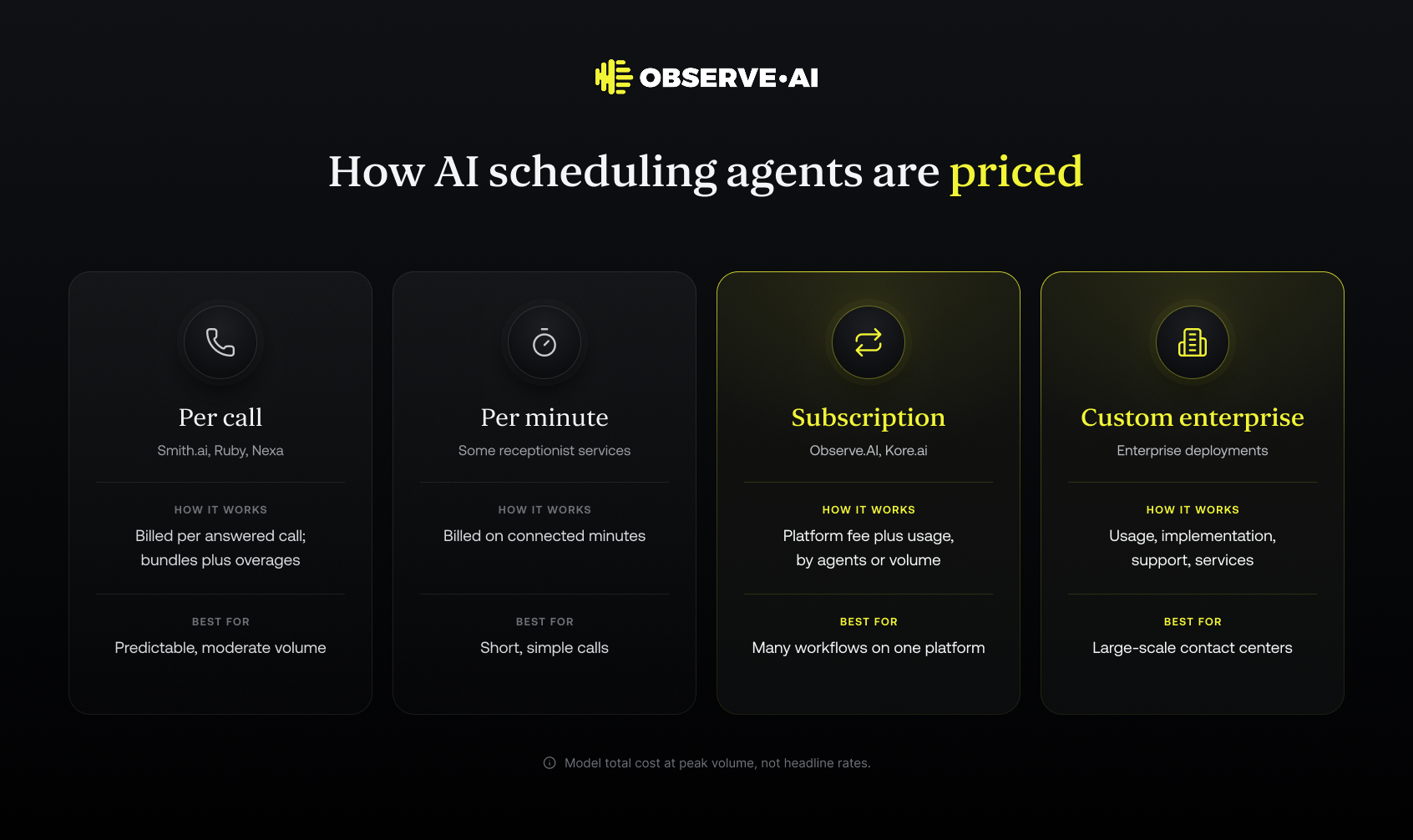
Per-Call, Per-Minute, Subscription, And Custom Pricing
AI appointment agents and Virtual Receptionist services use different pricing models:
- Per call: Common for AI Receptionist and Virtual Receptionist services such as Smith.ai, Ruby, and Nexa. Pricing is based on answered calls or on discrete receptionist interactions. Some tiers include a bundled number of calls, with overages charged above that.
- Per minute: Some services charge based on connected minutes, which can favor businesses with shorter, simpler appointment calls but may be less predictable for complex workflows.
- Seat-based or subscription: Enterprise voice AI platforms (including Observe.AI and Kore.ai) often use subscription models based on:
- Number of AI agents or channels.
- Estimated interaction volume.
- A combination of platform fee plus usage.
- Number of AI agents or channels.
- This model fits contact centers that want to standardize tooling across multiple workflows, not just scheduling.
- Custom enterprise pricing: For large-scale deployments, vendors typically offer custom contracts that include platform usage, implementation, support, and sometimes managed services for design and optimization.
Public, line-item pricing can be limited, especially for enterprise contracts. Teams should expect to engage sales for accurate estimates.
How Usage, Add-Ons, And Service Tiers Affect Total Cost
Total cost for an AI appointment agent often differs significantly from the headline rate. Key drivers include:
- Usage volume: Higher call or minute volumes reduce unit costs in many plans but increase overall spend. Enterprises should model peak volumes, not just averages.
- Hours of coverage: 24/7 answering, weekends, holidays, and after-hours routing often incur higher rates or separate plans in Virtual Receptionist models.
- Languages and channels: Multilingual support, chat in addition to voice, or SMS reminders can be bundled or charged as add-ons.
- Integrations and customization: Deep CRM or practice-management integrations may require:
- One-time implementation fees.
- Professional services from the vendor or a partner.
- One-time implementation fees.
- Agentic platforms like Observe.AI and Kore.ai may include additional costs for advanced analytics, QA, and lifecycle features if they are not part of the base subscription.
- Support and governance: Enterprises often require SLAs, dedicated account management, security assessments, and compliance documentation, all of which can affect pricing.
Teams should evaluate total cost of ownership (TCO), including implementation, configuration, ongoing optimization, and the internal resources needed to manage the solution.
Comparing Costs Against Expected Call Volume And Workflows
To compare options fairly, contact-center leaders often build a simple model:
- Map interaction types: Break out appointment-related calls (new booking, reschedule, cancellation, reminders) from non-scheduling calls.
- Estimate volumes and handle times: Use historical contact-center data to estimate:
- Number of calls per month per interaction type.
- Average handle time (AHT) for scheduling calls.
- Number of calls per month per interaction type.
- Apply each vendor's pricing structure: Translate volumes into:
- Calls or minutes for Virtual Receptionist services.
- Conversations or interaction units for AI agents.
- Calls or minutes for Virtual Receptionist services.
- Factor in downstream savings: Consider:
- Reduced live agent handle time due to pre-qualification and context.
- Lower no-show rates if the solution reliably sends confirmations and reminders.
- Potential agent reassignment to higher-value calls.
- Reduced live agent handle time due to pre-qualification and context.
For enterprises with very high volume and complex workflows, subscription-based voice AI platforms often provide better long-term economics and control than pure per-call Virtual Receptionist models, particularly when multiple workflows beyond appointment booking are automated on the same platform.
Calendar, CRM, And Practice-Management Integrations
Google Calendar And Microsoft Outlook Connectivity
Calendar integrations sit at the core of appointment scheduling.
Virtual Receptionist services. Smith.ai, Ruby, and Nexa typically support:
- Direct or connector-based integration with Google Calendar and Microsoft Outlook.
- Access to shared calendars for specific providers or locations.
- Basic rules for availability, buffer times, and appointment types.
For many businesses, this level of integration is sufficient if each location or professional maintains a structured calendar.
Voice AI agent platforms. Agentic CX platforms such as Observe.AI and Kore.ai usually connect to calendars in one of two ways:
- Via direct integrations with Google Workspace or Microsoft 365 APIs.
- Indirectly through a scheduling or practice-management system that itself syncs with the calendar.
This approach allows AI agents to:
- Check availability as part of a broader workflow.
- Respect complex scheduling logic embedded in back-office systems.
- Update calendar events while simultaneously updating CRM or EMR records.
Enterprises should confirm how calendar updates are synchronized and what happens when conflicts or failures occur.
Calendly And Acuity Booking Workflows
Tools like Calendly and Acuity are widely used by professionals and smaller teams as the front end of appointment scheduling. For CX appointment agents, there are two common usage patterns.
Virtual Receptionist with scheduling links. Receptionists can:
- Send or trigger Calendly or Acuity links via email or SMS.
- Complete a booking on behalf of the client by using the link directly.
- Follow internal rules on which link or calendar to use.
-
This pattern is simple but can create fragmentation if each provider has a unique link or configuration.
Voice AI agents orchestrating booking. Voice AI agents on platforms like Observe.AI or Kore.ai can:
- Call the Calendly or Acuity API in the background.
- Check available slots.
- Book the appointment directly during the call without exposing a link.
- Confirm the booking verbally while also triggering digital confirmations.
In this model, Calendly or Acuity act as the scheduling engine, while the voice agent provides a unified conversational interface across voice, chat, or SMS.
When evaluating integrations, enterprises should verify whether the vendor supports direct API-level integration with these tools or relies on generic connectors that may limit control and visibility.
Salesforce And Clio Data Exchange
For many organizations, appointment scheduling is tightly linked to CRM and practice-management workflows.
Salesforce and general CRMs.
- Virtual Receptionist services like Smith.ai and Nexa often support:
- Direct or connector-based integrations with CRM systems.
- Creation or updating of leads, contacts, or cases when an appointment is booked.
- Direct or connector-based integrations with CRM systems.
- Voice AI platforms (Observe.AI, Kore.ai) typically:
- Integrate with Salesforce and other CRMs through APIs or pre-built connectors.
- Orchestrate workflows that span scheduling, opportunity updates, and follow-up tasks.
- Provide analytics on conversation outcomes, including appointments created and revenue impact.
- Integrate with Salesforce and other CRMs through APIs or pre-built connectors.
Clio and legal practice-management systems.
- Legal-focused reception services (Smith.ai, Nexa) often emphasize Clio and similar tools for intake and booking.
- Enterprise AI agents can connect to Clio or equivalent practice-management platforms via APIs to:
- Create new matters or update existing ones.
- Log appointment details and case information.
- Enforce rules about who can book which type of appointment.
- Create new matters or update existing ones.
For enterprise contact centers, the strategic question is whether the appointment agent can participate in end-to-end workflows, from marketing to intake to ongoing service, rather than simply dropping an event on a calendar.
Choosing A Platform For Enterprise Contact Centers
Integration Depth, Governance, And Operational Control
Enterprise contact centers evaluating appointment scheduling agents should prioritize:
- Integration depth
- Ability to connect with existing scheduling, CRM, EMR, billing, and contact-center platforms.
- Support for real-time, bidirectional data exchange.
- Flexibility to add or change systems over time.
- Ability to connect with existing scheduling, CRM, EMR, billing, and contact-center platforms.
- Governance and guardrails
- Controls on what AI agents may say and do.
- Clear escalation paths and thresholds.
- Versioning, simulation, and testing processes for new behaviors.
- Controls on what AI agents may say and do.
- Operational intelligence and QA
- Visibility into every interaction, including transcripts and summaries.
- QA workflows to evaluate performance and compliance.
- Continuous learning loops to refine agents based on real call data.
- Visibility into every interaction, including transcripts and summaries.
Agentic CX platforms like Observe.AI are built around these requirements, treating AI agents as part of a lifecycle: build, test, deploy, evaluate, and improve. By contrast, most Virtual Receptionist services operate as managed providers with more limited transparency and configurability.
When A Receptionist Service Or Voice-Agent Platform Fits
A Virtual Receptionist or AI Receptionist service is usually the best fit when:
- Call volumes are moderate and concentrated in appointment booking or basic inquiries.
- The business does not have a large, centralized contact center.
- Calendars and practice-management systems are relatively straightforward.
- The organization prefers a service model over building and managing AI agents.
An enterprise voice AI platform or agentic CX platform is typically the better option when:
- Call volumes are high, and appointment scheduling is one of many workflows to automate.
- The contact center must integrate with multiple back-office systems.
- Governance, compliance, and QA are core requirements.
- Teams want to automate across channels (voice, chat, SMS) and support frontline agents with real-time assistance in addition to customer-facing automation.
Many large organizations adopt a hybrid approach, using Virtual Receptionist services for independent locations or small practices, while standardizing on a voice AI platform in centralized contact centers.
Should Teams Choose A No-Code Or Developer-Led AI Agent?
Choose a no-code AI agent or AI Receptionist when appointment workflows are simple, call volumes are moderate, and speed to launch matters most. Choose a developer-led platform when the voice agent must integrate with multiple back-office systems, enforce complex scheduling rules, and meet enterprise governance requirements. Most enterprise contact centers land on a hybrid: low-code configuration for business users, with developer support for deep integrations.
Factor
No-code AI agent or AI Receptionist
Developer-led AI agent platform
Examples
Smith.ai, Ruby, Nexa, no-code voice agent builders
Observe.AI, Kore.ai
Best fit
Small and mid-sized businesses, single practices, franchises
Enterprise contact centers
Time to launch
Days to weeks
Weeks to months
Integrations
Prebuilt connectors for Google Calendar, Microsoft Outlook, Clio, and common CRMs
API-level integrations with CRM, EMR, billing, and contact-center platforms
Scheduling logic
Standard rules: availability, buffers, appointment types
Complex rules: eligibility, provider specialty, multi-system lookups
Agent risk and escalation
Playbook-driven, varies by receptionist or template
Programmatic guardrails, confidence thresholds, context-rich handoffs
Governance and QA
Basic call logs and booking metrics
Simulation, versioning, and QA across every interaction
Pricing
Per call, per minute, or monthly plan
Platform subscription plus usage, or custom enterprise pricing
Who maintains it
Vendor or business owner
CX operations with IT or developer support
No-code is the right call when:
- Scheduling is the main or only workflow to automate.
- Calendars and practice-management systems are straightforward.
- There is no dedicated IT or developer capacity for the project.
- The business prefers a managed service, such as Smith.ai, over owning the agent.
Developer-led is the right call when:
- Appointment scheduling is one of many workflows on the roadmap.
- The voice agent must read from and write to several systems in real time.
- Regulated data (PHI, PII, payment information) requires strict controls and audit trails.
- The team needs to test, version, and continuously improve agents in production.
The decision is not permanent. Many organizations start with an AI Receptionist for a single location, then move to a developer-led voice agent platform as volumes grow and appointment workflows connect to more of the customer journey.
Frequently Asked Questions About Pricing And Integrations
How do AI appointment agent pricing models compare?
Virtual Receptionist and AI Receptionist services like Smith.ai generally charge per call or per minute, sometimes bundled into monthly plans. Enterprise voice AI platforms and agentic CX platforms favor subscription and custom enterprise pricing based on interaction volume and capabilities. The right model depends on call volume predictability and whether automation will cover multiple workflows beyond appointment booking.
Should teams choose a no-code or developer-led AI agent?
No-code tools and AI Receptionist services like Smith.ai accelerate initial deployment for straightforward appointment workflows. Developer-led approaches on platforms like Observe.AI or Kore.ai give enterprises more control over integrations, guardrails, and orchestration across systems. Many enterprises use a combination: low-code tooling for configuration plus developer support for deep systems integration.
Which integrations matter most for appointment scheduling?
For appointment-heavy CX, the critical systems are:
- Calendars (Google Calendar, Microsoft Outlook).
- Scheduling and practice-management platforms.
- CRM (for example, Salesforce) and, in legal, tools like Clio.
- The contact-center platform itself, so the voice agent or Virtual Receptionist operates within routing, reporting, and QA flows.
When is human escalation important for appointment booking?
Human escalation is essential when scheduling intersects with risk, urgency, or complex eligibility rules. AI agents and Virtual Receptionist services should be configured to escalate quickly when they detect:
- Clinical red flags.
- Legal or financial risk indicators.
- Complaints or high-value opportunities.
- Repeated failures to complete the appointment workflow.
How do teams choose an AI agent for their scheduling workflow?
Successful teams start from operations, not from demos. They:
- Map current appointment workflows and exceptions.
- Identify the systems that must participate (calendar, CRM, practice-management).
- Define guardrails, escalation rules, and quality thresholds.
- Compare Virtual Receptionist services and agentic CX platforms on:
- Integration depth and flexibility.
- Governance, QA, and performance monitoring.
- Total cost of ownership at expected volumes.
- Integration depth and flexibility.
By grounding the decision in real customer interactions and operational requirements, enterprises can select an AI appointment agent, or combination of agents and services, that delivers reliable scheduling, integrates with core systems, and supports long-term CX improvement.
Subscribe to our newsletter.
Frequently Answered Questions





G2
High Performer
AI agent 2026

G2
Leader
Conversation Intelligence

MetriStar
Top Provider 2026
